Did you know that The Church of Jesus Christ of Latter-day Saints has formed special relationships with partner genealogy websites? With your free FamilySearch account, you have access to family history subscription services including ancestry.com, findmypast, MyHeritage, AmericanAncestors, Geneanet, and Filae.
Try this: Go to https://familysearch.org/partneraccess Log in using your FamilySearch credentials and click on the "Join for free" button for the MyHeritage site. You can then create your MyHeritage account and download your family history information from familysearch.org.
Once you have a MyHeritage account, use the navigation bar at the top of the screen and go to Family tree -> My photos. Go ahead and upload a photo; an old black-and-white photo of an ancestor would be perfect. After clicking on the photo, you can "enhance" and "colorize" it to get an idea of what the person may have looked like in living color. See below for example results from my pioneer ancestor James Godson Bleak.
Try this: Go to https://familysearch.org/partneraccess Log in using your FamilySearch credentials and click on the "Join for free" button for the MyHeritage site. You can then create your MyHeritage account and download your family history information from familysearch.org.
Once you have a MyHeritage account, use the navigation bar at the top of the screen and go to Family tree -> My photos. Go ahead and upload a photo; an old black-and-white photo of an ancestor would be perfect. After clicking on the photo, you can "enhance" and "colorize" it to get an idea of what the person may have looked like in living color. See below for example results from my pioneer ancestor James Godson Bleak.
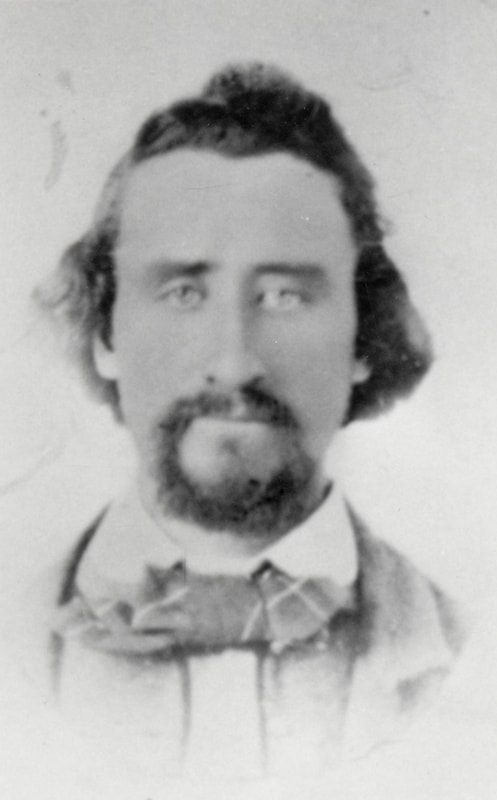
Original family history photo as copied from familysearch.org
|
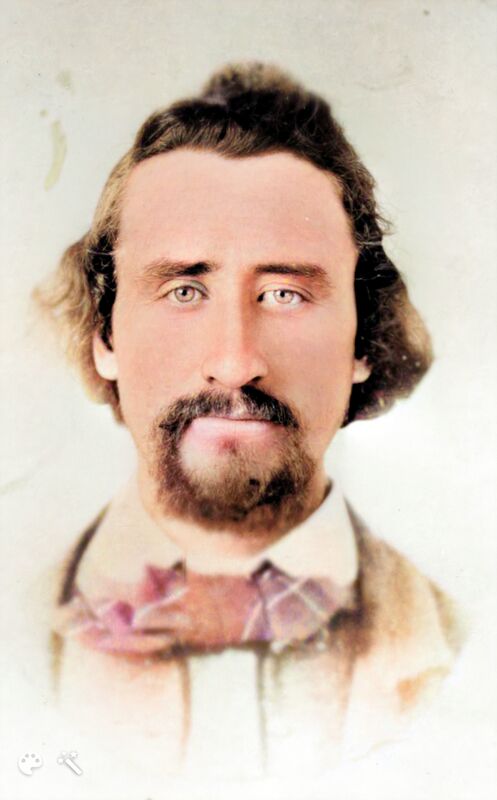
Portrait enhanced and colorized using MyHeritage website
|
After enhancing and colorizing your photo, you are ready to animate! Here is a link using the default animation, but there are 10 animation schemes to choose from. Have fun experimenting and watching your old photos come to life!
This example was provided by Brother Powell.